Disclosure: Some links in this article are affiliate links. If you buy through them, we may earn a small commission at no extra cost to you. We only recommend products we've researched or tested; see our editorial standards.
Model Y Road Trip With Kids
Rear-screen streaming, tablets for the base Model Y, power for every device, and easy Supercharger stops.
GUIDES / ROAD TRIPS
Tesla Model Y Road Trip With Kids: Rear Screen, Tablets and Power for the Holidays
How do you keep kids busy in the back of a Model Y?
On a Model Y Premium, Performance or Model Y L, the 8-inch rear screen keeps streaming Theater apps like Netflix, YouTube, Disney+ and Hulu while you drive, with up to two Bluetooth headphones. HBO Max and Prime Video aren't in Theater, so download those to a tablet. The base Model Y has no rear screen: use a Tesla-specific tablet mount and the rear USB-C ports.
Thanksgiving is November 26 and Christmas travel follows. What the back seat can do depends on your trim, and one popular streaming trick stopped working in October. Here's what works, from Tesla's owner's manual and the listings I checked on Oct 30, 2026.
What your trim has
Model Y (base / Standard)
No rear screen
Tablet in a seat-back mount, charged from the rear USB-C ports. Tesla lists 3 USB-C ports on this trim.
Model Y Premium & Performance
8-inch rear touchscreen
Theater streaming on the rear screen, with USB-C ports below the rear vents for tablets.
Model Y L (6 seats)
8-inch rear touchscreen
Same rear screen, plus two more USB-C ports under the third-row cushions.
Not sure which Model Y you have? Here's how to tell the base Model Y apart.
Getting the most from the rear screen
- • It streams while you drive. Tesla's manual says video pauses on the front screen when you shift out of Park, but the rear screen keeps playing video and audio.
- • It needs a connection. Theater works on Wi-Fi or with Premium Connectivity and a cellular signal. On a long drive through dead zones, a downloaded show on a tablet is the backup.
- • Headphones keep the front quiet. On the rear screen, open Settings and pair up to two sets of Bluetooth headphones, or pair them from the front with the Rear Screen app.
- • You stay in charge. The Rear Screen app on the front screen controls audio, video and climate in back, and Controls > Display > Lock Rear Display locks it.
- • Games work too. The rear screen has a Gaming section, and each screen can connect two Bluetooth devices at once, such as two game controllers.
Which streaming apps work
The rear screen has no web browser, so passengers get only Tesla Theater's apps, which include Netflix, YouTube, Disney+ and Hulu. HBO Max and Prime Video aren't on the list.
The browser trick no longer works
Passengers used to reach a full browser through YouTube's privacy-policy page and stream anything. On October 13, 2026, Not a Tesla App reported that Tesla blocked it. If your kids' shows are on HBO Max or Prime Video, download them to a tablet at home.
Tablet mounts that fit the Juniper seats
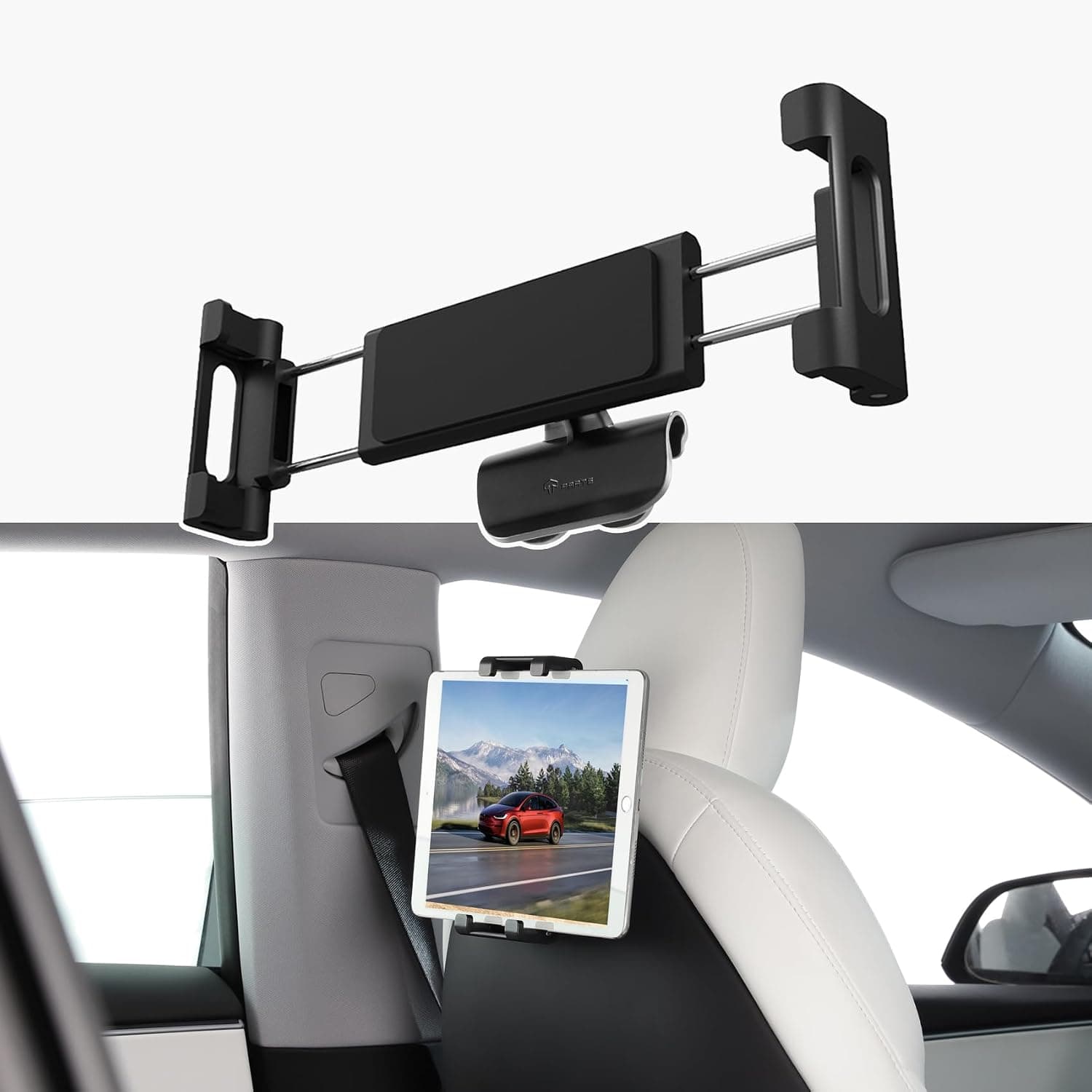
The Model Y's front headrests are part of the seat, with no exposed posts, so the usual post-clamp mounts have nothing to grab. Pick a mount made for Tesla seats. Mounts that clip into the gap at the top of the seat back can clash with seat-back kick protectors, so take those off first.
TPARTS backseat tablet mount
$26.00 on Amazon (Oct 30, 2026)
Listed for Model 3 Highland 2024+ and Model Y Juniper 2025+. Holds tablets up to a 12.9-inch iPad Pro, rotates 360 degrees, and the arm folds away.
Check the TPARTS mount →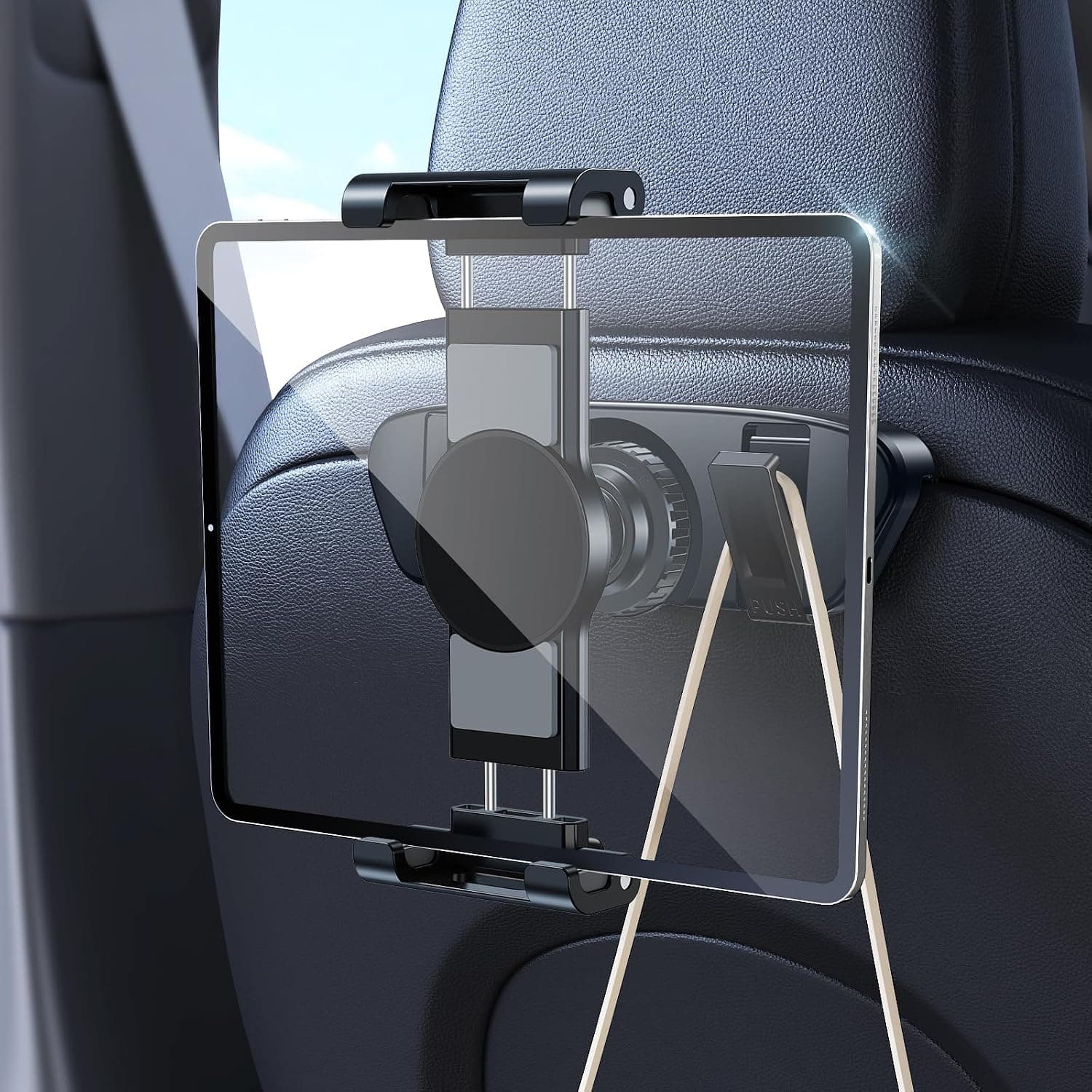
DICMKY magnetic tablet mount
$25.99 on Amazon (Oct 30, 2026)
Listed for Model Y Juniper and Model 3 Highland. It twists in place between the seat parts with no drilling or adhesive, takes a tablet or a magnetic phone, and adds two bag hooks.
Check the DICMKY mount →Power for every device
- • USB-C in back. On five-seat cars, Tesla's manual lists two USB-C ports below the rear vents and one in the rear of the center console; the Model Y L adds two under the third-row cushions. Pack a short USB-C cable per tablet.
- • 12V outlet. There's one in the center console and one on the left side of the trunk, rated for 12A continuous (16A peak), enough for a small cooler.
- • Power while parked. The ports stay powered while the car is awake, for example with Camp Mode or Keep Climate On, so you can keep tablets charging during a break.
Supercharger stops and breaks
Turn on Trip Planner and the route adds Supercharger stops on its own. When you navigate to a Supercharger, the car preconditions the battery so you arrive ready to charge faster. For a third-party fast charger, enter it as the destination in the car's navigation and it preconditions too.
Charging stops are the natural snack and bathroom breaks. Arcade games need a controller or the steering-wheel buttons, and Toybox works while parked, which helps fill a 20-minute charge.
Night-before checklist
- ☐ Download shows to tablets (especially HBO Max and Prime Video)
- ☐ Pair kids' Bluetooth headphones to the rear screen
- ☐ Mount the tablet and test it at full recline
- ☐ One USB-C cable per device, plus a charger for the 12V outlet
- ☐ Trip Planner on, destination entered
- ☐ Tire pressure checked (cold drops it about 1 PSI per 10°F)
- ☐ Trash bags and wipes in the door pockets
- ☐ Heading into snow? See the winter guide
FAQ
Can the Model Y rear screen play video while driving?
Yes. Tesla's manual says the front screen pauses video when you shift out of Park, but the rear touchscreen keeps streaming with video and audio. It's on the Model Y Premium, Performance and Model Y L; the base Model Y has no rear screen. Streaming needs Wi-Fi or Premium Connectivity.
Which streaming apps work on the Tesla rear screen?
Only the apps in Tesla Theater, such as Netflix, YouTube, Disney+ and Hulu. HBO Max and Prime Video aren't in Theater, and in October 2026 Tesla blocked the YouTube-to-browser trick passengers used to reach them, according to Not a Tesla App. Download those shows to a tablet before the trip instead.
How do I connect headphones to the Model Y rear screen?
On the rear screen, open Settings and pair up to two sets of Bluetooth headphones. You can also do it from the front screen through the Rear Screen app, and lock the rear screen under Controls > Display > Lock Rear Display.
Does the base Model Y (Standard) have a rear screen?
No. Tesla's feature list for the base Model Y shows only the 16-inch front touchscreen. Plan on a tablet in a seat-back mount, powered from the rear USB-C ports.
What tablet mount fits the 2025–2026 Model Y?
Pick one made for Tesla seats. The Model Y's front headrests are built into the seats with no exposed posts, so post-clamp mounts don't fit. TPARTS and DICMKY sell mounts whose listings name the Model Y Juniper; ones that clip into the seat-back gap can clash with seat-back kick protectors.
Sources
- Tesla Model Y owner's manual: Touchscreen (rear screen, headphones, lock)
- Tesla Model Y owner's manual: Theater, Arcade, and Toybox
- Tesla Model Y owner's manual: Interior Electronics (USB and 12V)
- Tesla Model Y owner's manual: Maps and Navigation (Trip Planner, preconditioning)
- Not a Tesla App, Oct 13, 2026 (browser workaround blocked)
Keep reading
Owner guide
Best USB Setup for Tesla Model Y: Sentry Storage, Hubs, and Extra Ports
Reliable USB storage for Sentry Mode and dashcam in the Model Y, and when a hub for extra ports makes sense.
Best picks
Tesla Model Y Winter Accessories 2026
Winter buyer guide by wheel size, sourced from Tesla's US owner's manual and Tesla Shop: tire sizes, Tesla winter tire packages and prices, approved König chains and Tesla snow socks, windshield covers, foam snow brushes, and free cold-weather settings.
Problem page
Tesla Winter Range Loss
Explains normal winter range-loss drivers and owner actions: preconditioning, charger margin, tire pressure, speed, wind, and energy-data checks.
Owner guide
Tesla Jack Pads and Roadside Kit: What to Carry Before a Flat Tire
Roadside kit guide covering jack pads, a compressor, a plug kit, spare-tire tradeoffs, and what to tell a tow driver.
Different Model Y? What fits the Model Y Standard · What fits the Model Y L